[ ESP32 Bluetooth Proxy for Home Assistant ]
Short guide for flashing an ESP32 as a Bluetooth proxy for Home Assistant — extends HA's BLE range across the house without any coding. Web-flash from Chrome, auto-adopt into HA, plug in near the room you want to cover. About 10 minutes start to finish per proxy.
[ What it does ]
A Bluetooth proxy extends HA's Bluetooth range. The ESP32 picks up BLE devices near it (Govee sensors, Xiaomi sensors, Mijia thermometers, Inkbird probes, etc.) and forwards the data to HA over WiFi. Great for covering rooms your HA server's built-in Bluetooth can't reach — basements, garages, far ends of a long house.
  [ BLE sensor ]  >>>  [ ESP32 proxy ]  >>>  [ Home Assistant ]
  (Govee, Xiaomi)       (ESPHome FW)            (over your WiFi)
[ What you need ]
  - ESP32 board (any variant: ESP32, ESP32-S3, ESP32-C3, M5Stack Atom)
  - USB cable (data-capable, not just charge)
  - Chrome or Edge browser (required for the web flasher)
  - A PC or Mac with a USB port
  - A working Home Assistant install on the same WiFi network
Time: ~10 minutes per proxy.
[ Step 1 — Flash via ESPHome Web ]
No coding required. The whole flash happens in a web page.
  1. Go to https://web.esphome.io in Chrome or Edge
  2. Plug the ESP32 into the PC via USB
  3. Click Connect → select the ESP32's serial port
     (often shows up as "USB Serial" or "CP210x"; see
     Troubleshooting if it's missing)
  4. Click Install → select Bluetooth Proxy from the project list
  5. The page downloads and flashes the firmware automatically
     (~2 minutes)
  6. Once done, click Connect to Wi-Fi and enter your network
     SSID + password
The ESP32 reboots, joins WiFi, and starts advertising itself as an
ESPHome device. No .yaml editing, no esphome run
commands — the project profile that ships with ESPHome Web handles
all of it.
[ Step 2 — Adopt into Home Assistant ]
HA auto-discovers the proxy on the local network:
  1. Open HA → Settings → Devices & Services
  2. A notification should appear: "ESPHome — Bluetooth proxy discovered."
  3. Click Configure → Submit
  4. The device shows up as an ESPHome integration with Bluetooth proxy
     enabled
No password required at adoption time — the default
web.esphome.io profile doesn't set an API password. You
can lock it down later via the ESPHome dashboard if you want; see
"Where to go from here" below.
If auto-discovery doesn't fire within a minute, go to
Settings → Devices & Services → + Add Integration → ESPHome
and enter the proxy's IP manually. Find it via your router's
DHCP client list (look for a hostname starting with esp32-).
[ Step 3 — Verify it's working ]
Go to Settings → Devices & Services → Bluetooth. You should see a new Bluetooth adapter listed, named after the proxy.
Any BLE devices in range start auto-discovering through it. For example, a Govee H5075 sensor will show up under Devices within ~30 seconds of the proxy coming online. Plant the proxy 3–4 meters from a known BLE device and confirm HA picks it up.
[ Placement tips ]
  - Needs USB power, so use a wall adapter or a powered USB hub.
  - Place centrally in the room you want coverage in.
  - Mid-height works best for BLE, so keep it off the floor.
  - Don't enclose in a metal cabinet (Faraday cage kills BLE).
  - Bluetooth and 2.4 GHz WiFi share spectrum, so try not to put the
    proxy directly on top of your router. ~1m separation helps.
[ Best ESP32 boards for this ]
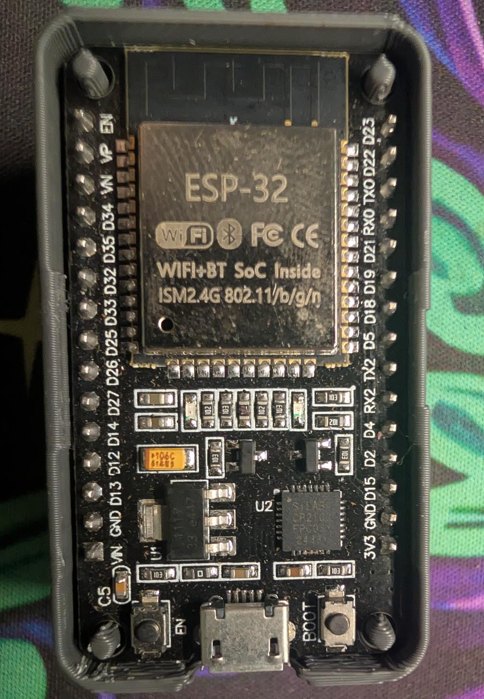
  ESP32 DevKit       classic 38-pin WROOM-32 board, the cheap,
                     everywhere workhorse. Dual-core, more than enough for
                     proxy duty. Getting-started guide.

  ESP32-C3 Mini      tiny, cheap (~$5 in 5-packs). Single-core RISC-V;
                     plenty for proxy duty. Great for hiding behind
                     furniture.

  ESP32-S3           dual-core, BLE 5 + better antenna. Worth the
                     extra ~$3 if you want a 2-3m range bump.

  M5Stack Atom Lite  compact case, USB-C, looks clean if it's
                     going to be visible. Same ESP32 chip underneath;
                     you're paying for the enclosure.

  Olimex ESP32-EVB   overkill for proxy use, but useful if you want
                     PoE or extra GPIO for something else on the same
                     device.
Cheap unbranded ESP32 dev boards from Aliexpress / Amazon also work fine — the firmware doesn't care about the silkscreen.
[ Troubleshooting ]
Web flasher doesn't see the port:
  - Wrong browser. Chrome or Edge only (Web Serial API).
  - Missing USB driver. CP210x boards need the Silicon Labs driver on
    Windows; CH340 boards need the WCH driver. Both are 30-second
    installs from the vendor's site.
  - Bad USB cable. A lot of cables are charge-only, so try a known
    data-capable one.
  - BOOT button. Some boards require holding BOOT while clicking
    Connect.
Proxy doesn't show up in HA:
  - Different VLAN/subnet than HA. mDNS doesn't cross VLANs by
    default; either move it to the same network or add a manual
    ESPHome integration with the IP.
  - Wrong WiFi credentials. Reconnect via USB, click Connect, then
    re-enter WiFi creds.
  - HA Bluetooth integration not loaded. Settings → Devices &
    Services → + Add Integration → "Bluetooth" first.
BLE devices nearby but not discovering:
  - Some devices broadcast rarely (every 30s+ for low-power sensors).
    Wait a few minutes.
  - The device may already be paired/bonded to something else (e.g.,
    your phone). Forget it from the phone first.
  - Confirm the device uses BLE advertising, not classic Bluetooth.
    Proxies only handle BLE.
[ Adding more proxies ]
Each additional ESP32 just goes through the same flash + adopt loop. HA happily uses multiple proxies in parallel — it picks whichever has the strongest signal for each BLE device. Practical layouts:
  - One per floor of the house
  - One per BLE-heavy room (kitchen, garage, plant room)
  - One near every cluster of BLE sensors that are out of range of
    the HA server
There's no real limit on count — the bottleneck is your WiFi network, not HA.
[ Where to go from here ]
  - Lock down the proxy via the ESPHome dashboard: set an API password
    and OTA password, disable the HTTP webserver.
  - If you have lots of stationary BLE thermometers, look at the
    passive_only config option, which drops API overhead for sensors you
    don't need to actively poll.
  - For long-term reliability, plug proxies into a UPS or
    brown-out-tolerant DC supply. BLE re-discovery after a 10-second
    power blip can take minutes; a UPS smooths that over.
[ Raw markdown ]
This guide is also available as a single markdown file: