
[ Volcano Hybrid + Home Assistant ]
Prefer no Home Assistant? There's a browser Web Bluetooth controller that
drives the Volcano straight from Chrome/Edge over BLE; one BLE connection at a
time, so use one or the other.
Five YAML files for driving a Storz & Bickel Volcano Hybrid from Home Assistant: an auto-progress temperature automation, a manual ±step action set for dimmer remotes, a fill-a-bag script, six voice commands wired through HA Assist, and a single-paste Lovelace dashboard card. Each file is independent — drop in whichever ones you want, or use all five together. Targets the Vapesuvius temperature ladder for sequential flavor / cannabinoid extraction.
[ Overview ]
  Component                                  Purpose
  ─────────────────────────────────────      ──────────────────────────────────────
  volcanoHybridProgress.yaml.txt             runtime-driven temperature ladder
  volcanoHybridStepTemp.yaml.txt             manual ±step (dimmer remote)
  volcanoHybridFillBag.yaml.txt              heater→fan→top-off bag-fill script
  volcanoHybridVoice.yaml.txt                six voice commands (HA Assist)
  volcanoHybridLovelace.yaml.txt             control-surface dashboard (compact)
  volcanoHybridLovelaceSession.yaml.txt      session dashboard (full ladder + gauge)
  volcanoHybridLovelaceSessionLite.yaml.txt  session dashboard, no runtime deps
  volcanoHybridRuntimeTemplate.yaml.txt      synthesized runtime sensor (template)
Requires
SavageNL/home-assistant-volcano-hybrid
(community HACS integration), which exposes the device as
climate.volcano_hybrid with a current_on_time
sensor. The pack is retargetable to other vaporizers or heated-element
devices by swapping those two entity refs — most of the logic is
generic state-machine work, not Volcano-specific API calls.
[ Vapesuvius temperature ladder ]
An informal sequential extraction schedule from u/Vapesuvius's unofficial S&B temp guide (2nd ed., 2022). Each rung sits in a different cannabinoid / terpene window, so walking the ladder by runtime extracts a different fraction at each step.
  Step   °C    °F    Coverage
  ────   ───   ───   ──────────────────────────────────
   1    179   354   auto-progress (0 min)
   2    185   365   auto-progress (5 min)
   3    191   375   auto-progress (10 min)
   4    199   390   auto-progress (15 min)
   5    205   401   auto-progress (20 min)
   6    211   411   extension — add trigger above: 25
   7    217   422   extension — add trigger above: 30
   8    230   446   extension — add trigger above: 35
Steps 1–5 are what the auto-progress automation ships with;
steps 6–8 are trivial to add — copy any existing trigger
block and bump the above: minute count + the
id: target temperature.
[ 1. Auto-progress automation ]
volcanoHybridProgress.yaml.txt — walks the temperature ladder automatically over runtime: 179° at 0 min, 185° at 5, 191° at 10, 199° at 15, 205° at 20.
Pattern worth stealing: each trigger's
id: is the target temperature value, so the action plugs
{{ trigger.id }} straight into
climate.set_temperature — adding a step is a
one-trigger edit. The reconnect-guard condition prevents BLE dropouts
from firing the next ladder step prematurely.
[ 2. Manual ±step (dimmer remote) ]
volcanoHybridStepTemp.yaml.txt — snap-to-rung action snippets for a dimmer remote's up/down buttons.
Templates compare current temp against each rung in order so pressing "up" from 188 goes to 191 (not 199), and "down" goes to 185 (not 179) — predictable regardless of where the auto-progress automation has the temp sitting. Combined with on/off short/long bindings (heat / fan), a 4-button dimmer becomes the entire Volcano control surface. Hue-remote wiring example inline.
[ 3. Fill-a-bag script ]
volcanoHybridFillBag.yaml.txt — push-button named script that runs the full bag-fill sequence end-to-end:
  heater on →  wait for heatup  →  10s stabilize  →
  fan on for ~41s  →  fan off  →  10s top-off window  →  heater off
continue_on_timeout: true on the heatup wait guards
against BLE hang. Tuning notes inline for bag size and temperature
scaling. Callable as script.volcano_fill_bag from
automations, dashboards, voice commands, or anything else that can
trigger a script.
[ 4. Voice commands (HA Assist) ]
volcanoHybridVoice.yaml.txt — six named intents wired through HA's built-in Assist conversation engine:
  fill a bag       start session     stop
  temp up          temp down         status
Works on every Assist surface — mobile-app mic, dashboard mic, M5Stack Atom Echo / Wyoming / ESPHome voice satellites, HA Voice Preview — all locally via Piper STT/TTS, no cloud round-trip. The status intent uses a Jinja-templated TTS response to read live state back: useful pattern for any intent that needs to report a sensor value out loud, not just trigger an action.
Two-part install:
intent_script: block in configuration.yaml
+ sentences file at
config/custom_sentences/en/volcano.yaml.
[ 5. Lovelace dashboards ]
Two dashboard flavors ship in the pack — pick whichever fits how you actually use the Volcano. Both are stock Lovelace cards only, no HACS dependencies. Paste into any dashboard via the raw configuration editor or the Manual card option in the UI.
volcanoHybridLovelace.yaml.txt — control-surface (compact)
Single vertical-stack card with the standard control surface: live current/target temperature header, the built-in thermostat slider, ±step buttons that walk the Vapesuvius ladder one rung at a time (via the dimmer-remote scripts), fan-on / fan-off pair, a confirmation-guarded "Fill a bag" action, and an auto-progress automation toggle row. Best for a small dashboard tile alongside other devices.
Status-header markdown reads temperature_unit from the
climate entity, so the card renders correctly on both °C and °F
installs without edits. A custom mushroom-card variant lives
in the same file (commented out) for users running HACS who want a
prettier surface — same controls, glossier defaults.
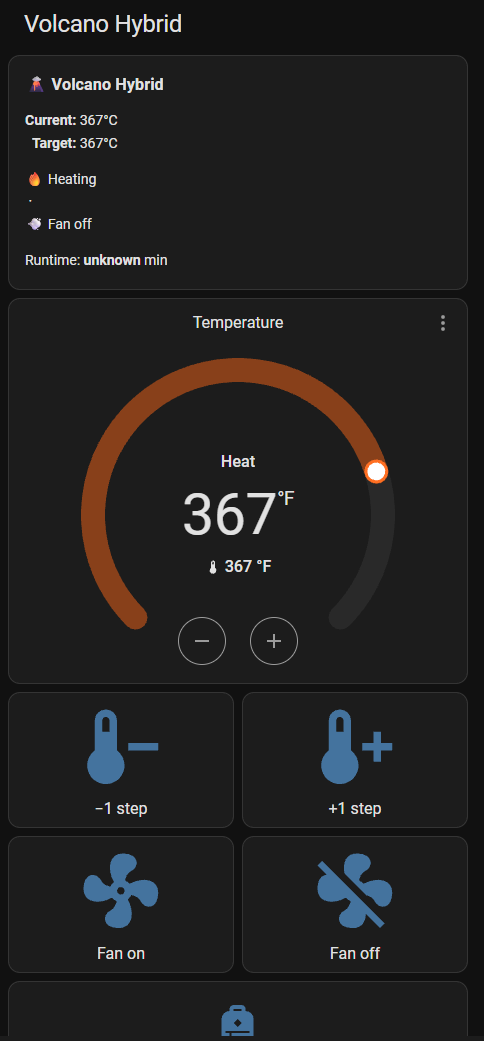
volcanoHybridLovelaceSession.yaml.txt — session dashboard (full)
Richer dashboard focused on actively running a session. Replaces the ±step pair with five direct-jump buttons — one per Vapesuvius rung (1: 179° / 2: 185° / 3: 191° / 4: 199° / 5: 205°) — so you can see the whole ladder at a glance and jump anywhere in one tap. Adds a live "next step in X min" countdown in the status header when the auto-progress automation is on, plus a gauge card showing your runtime against the 20-minute ladder window. The Fill-a-bag button becomes the marquee CTA (taller icon, confirmation guard).
  Layout (top → bottom):

    1. Status header (current/target/heating/fan/runtime + countdown if auto)
    2. Thermostat slider (default functionality, fine-tune off-ladder)
    3. Vapesuvius ladder: 5 horizontal buttons, jump direct to any rung
    4. Auto-progress: toggle + runtime sensor
    5. Ladder progress gauge (0–25 min, severity bands at rung boundaries)
    6. 🎈 Fill a bag: primary CTA, confirmation-guarded
    7. Fan on / Fan off: chamber purge between bags
No companion scripts required — the ladder buttons call
climate.set_temperature directly with the target temp. Steps
6–8 (211/217/230°) are commented in the file as drop-in
extensions for longer sessions.
[ Runtime sensor (template fallback) ]
The auto-progress automation, the full session dashboard's "next
step in X min" countdown, and the ladder-progress gauge all depend on a
runtime sensor — a value that counts up in minutes
from the moment the Volcano starts heating. The SavageNL integration is
supposed to expose one as
sensor.volcano_hybrid_current_on_time, but some versions
of the integration only ship
sensor.volcano_hybrid_auto_off_time (a
countdown toward auto-shutoff, not an elapsed-time counter).
If your install is in the second camp, the auto-progress and gauge bits
won't work out of the box.
Fix: synthesize the missing sensor yourself with a tiny trigger-based
template. Paste this into configuration.yaml under the
top-level template: key (or grab it from
volcanoHybridRuntimeTemplate.yaml.txt):
template:
  - trigger:
      - platform: time_pattern
        minutes: "/1"             # update every minute while heating
    sensor:
      - name: "Volcano Runtime"
        unique_id: volcano_runtime_synthesized
        unit_of_measurement: min
        device_class: duration
        state: >
          {% raw %}{% if is_state('climate.volcano_hybrid', 'heat') %}
            {{ ((as_timestamp(now()) - as_timestamp(states.climate.volcano_hybrid.last_changed)) / 60) | int }}
          {% else %}
            0
          {% endif %}{% endraw %}
        availability: >
          {% raw %}{{ states('climate.volcano_hybrid') not in ['unknown', 'unavailable'] }}{% endraw %}
How it works
  - Triggers on a time_pattern (every minute), evaluates state
  - Reads climate.volcano_hybrid.last_changed, the wall-clock moment
    the climate entity entered its current state
  - If state is `heat`, returns (now - last_changed) in whole minutes
  - If state is anything else, returns 0 (resets the counter)
  - Marked unavailable instead of stale when the integration drops
Wiring it in
After a HA restart, sensor.volcano_runtime appears in
Developer Tools → States. To plug it into the rest of the pack,
swap every reference to sensor.volcano_hybrid_current_on_time
for sensor.volcano_runtime:
  Auto-progress automation  (volcanoHybridProgress.yaml.txt)
    - trigger: numeric_state for: minutes  → point at sensor.volcano_runtime

  Full session dashboard    (volcanoHybridLovelaceSession.yaml.txt)
    - status header template var `runtime`
    - Auto-progress entities card row
    - Gauge card entity:
~6 lines to find-and-replace per file.
Caveats
  1. Resets on any state change away from `heat`. Including momentary
     BLE dropouts that flip climate.volcano_hybrid to `unavailable` briefly.
     If your install drops BLE a lot, you'll see the counter jump back to
     0 unexpectedly. See the smoothing tip below.

  2. Minute-level granularity. Updates fire once per minute on the
     time_pattern trigger. Fine for a 5-min-rung ladder; if you need
     sub-minute resolution, swap the pattern to `seconds: "/30"`.

  3. Not a replacement for the integration's real on-time counter. If
     the SavageNL integration ever exposes current_on_time in a
     future release, switch back, since the native sensor is BLE-event-driven
     and won't have the reset-on-disconnect caveat.
Smoothing tip — debounce BLE blips
If a BLE dropout-and-reconnect keeps resetting the counter mid-session,
debounce the climate entity's state changes via a
binary_sensor.template that's "ON" only when heating has
been stable for 30+ seconds, and key the runtime template off that
instead:
  template:
    - binary_sensor:
        - name: "Volcano Heating Stable"
          unique_id: volcano_heating_stable
          state: "{% raw %}{{ is_state('climate.volcano_hybrid', 'heat') }}{% endraw %}"
          delay_on: "00:00:30"
          delay_off: "00:00:30"
Then point the runtime sensor's template at
binary_sensor.volcano_heating_stable instead of the raw
climate state. Adds 30s of latency to the counter starting but eats
short BLE blips silently.
[ Install ]
Five files, all optional — install whichever subset you want.
The common prerequisite is the
SavageNL HACS integration
exposing climate.volcano_hybrid.
### 1. Auto-progress + Fill-a-bag + Step (paste into configuration.yaml or
your split-config) automation: !include_dir_merge_list automations/ script:
!include scripts.yaml

###  2. Voice commands  (configuration.yaml)
intent_script: !include volcanoHybridVoice.yaml

# plus the sentences file (creates the directory if needed): mkdir -p
~/config/custom_sentences/en cp volcanoHybridVoice-sentences.yaml
~/config/custom_sentences/en/volcano.yaml

###  3. Lovelace tile  (raw configuration editor or Manual card)
# paste the contents of volcanoHybridLovelace.yaml.txt as a new card
Restart Home Assistant after the YAML changes. Voice commands need a full restart (not just a config reload) to pick up the new intent script.
[ Source ]
All five YAML files in one directory, individually downloadable: