
[ Getting Started with the Baofeng UV-5R Mini ]
[ Overview |
The rules come first |
What you get |
Getting around the radio |
Start by listening |
Programming it |
Repeaters in two minutes |
My Hawaii channel list |
Getting licensed |
Worth upgrading |
Firmware and known quirks |
FAQ ]
[ Overview ]
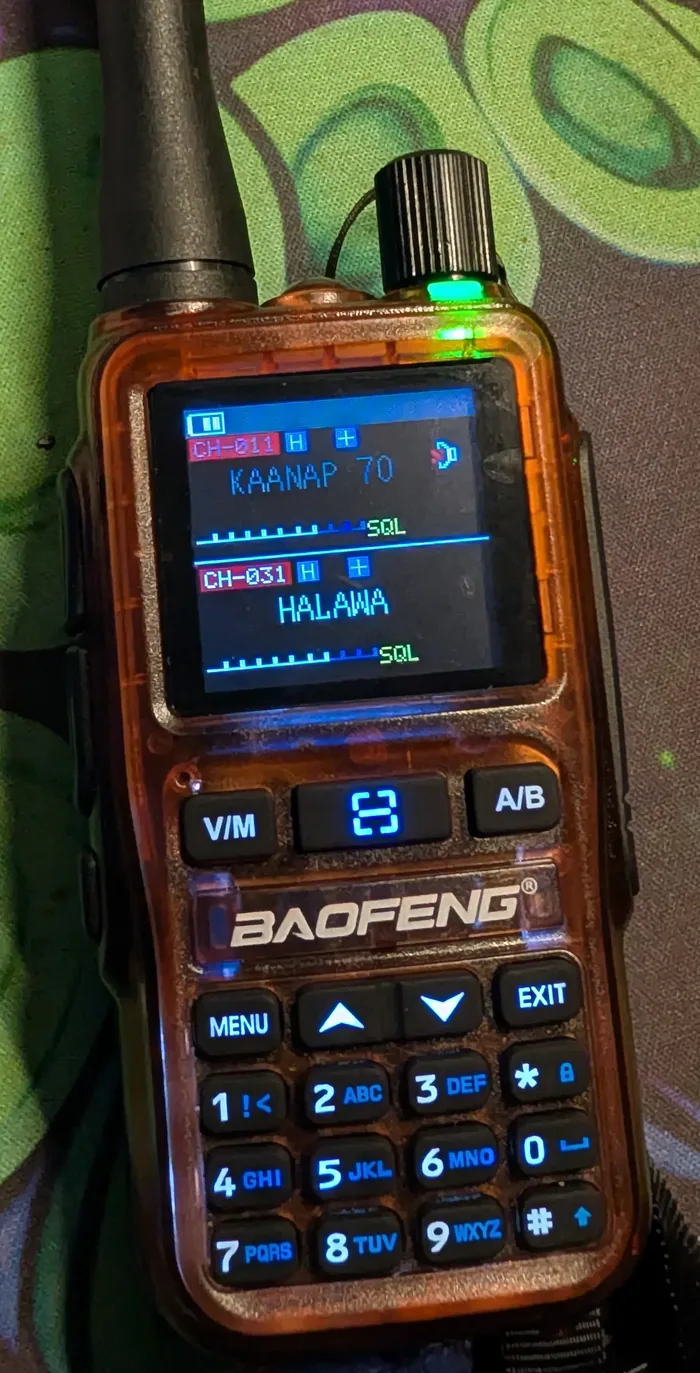
I carry a UV-5R Mini, programmed for the repeaters around Maui. It's
Baofeng's pocket-sized take on the radio that got a lot of people into ham
radio. It's a dual-band handheld: it talks on 2 meters (VHF)
and 70 centimeters (UHF), and it listens to a lot more, including FM
broadcast, weather radio and the aircraft band. It charges over USB-C, it has
a small color screen, and you can program it from your phone over Bluetooth.

It's cheap, and that's the point. It makes a good first radio to learn on.
Just know what it is: a basic handheld with a small antenna, not a magic
long-range radio. Most of what you'll do with it at first is listen, and
that's the right place to start.

This guide gets you from the box to your first contact: the rules, the
controls, what to listen to, programming it properly, how repeaters work, and
getting licensed. If you're in Hawaii, my channel list is further down.
[ The rules come first ]
This part matters more than any setting. I'm writing for the US; other
countries have their own rules, so check yours.

Listening is fine. Anyone can receive with this radio: ham repeaters,
weather, FM broadcast, the aircraft band.

Transmitting is where the rules start:

  - Ham bands (2 m and 70 cm): you need an amateur radio license. The
    entry-level one, Technician, covers everything this radio can do.
  - FRS, GMRS and MURS (the "walkie-talkie" channels): don't transmit
    there with this radio. Those services need radios certified for them
    under FCC Part 95, and the UV-5R Mini isn't. A GMRS license doesn't
    change that, because it covers you, not the radio.
  - Everything else (public safety, business, marine): listen at most,
    never transmit.

Once you're licensed, two habits keep you legal: say your callsign at least
every 10 minutes and at the end of a conversation, and don't encrypt or
scramble anything. The rules live in FCC Part 97.

People will tell you the rules let anyone transmit in an emergency. There is
an emergency provision, but it's written for licensed stations, and it's a
last resort, not a plan. It's one more reason to get licensed and learn the
radio before you need it.
[ What you get ]
  Transmit      136-174 MHz and 400-480 MHz, but you may only use the
                ham bands inside those: 144-148 and 420-450 MHz
  Receive       also FM broadcast, airband (108-136 MHz, AM) and the
                weather channels
  Power         rated 5 W on high, about 2 W on low
  Memory        999 channels, no banks or zones
  Battery       7.4 V Li-ion, 1600 mAh (some kits ship 2200 mAh), with
                a USB-C port on the battery itself
  Screen        1.44" color
  Jacks         SMA antenna; Kenwood-style 2-pin jack for speaker mics,
                earpieces and the programming cable
  Size          about 107 x 52 x 37 mm, 200 g with the battery

Rated power is optimistic on cheap radios. Reviewers have measured the high
setting at anywhere from about 4 W (Miklor's bench test) to a little
over 5 W. That difference is small on the air. The antenna and how high you
are matter far more than one watt.
[ Getting around the radio ]
The keys that matter on day one:

  V/M           switch between frequency mode (VFO) and channel mode
  A/B           switch which of the two lines on the screen is active
  Up / down     step through channels, or frequencies in VFO mode
  MENU          open the settings; EXIT backs out
  * (hold)      lock or unlock the keypad
  # (hold)      start or stop scanning
  0 (hold)      the weather channels (hold # there to scan them)
  Side PTTs     two transmit buttons, one for each of the A and B lines
  Side key      a short press does one job you choose: FM radio, scan,
                search, VOX, flashlight or SOS. Hold it to open the
                squelch and hear weak signals.

The volume knob is on top, next to the antenna and the flashlight.

Dual watch. The radio watches two channels at once, shown as the A and B
lines on the display. Strictly, it flips between them fast and stops on
whichever one has a signal, so you won't hear both talking at the same time.
The A/B key switches which line is active, and that's the one you transmit on.
A common setup is to keep one side on your main repeater and the other on a
scan or on WX2. If you only ever hear one line, turn on Dual Watch under Radio
Set in the menu (item 15 in the manual, MENU then 2). A D on the first line
means it's on.

Two habits I'd build right away. Lock the keypad before it goes in a pocket.
And watch which PTT you press: the two sit close together, and keying up on
the wrong line is an easy mistake.

One warning about the menus: this radio runs newer firmware than the original
UV-5R (CHIRP even drives it with a different module), so old UV-5R menu
cheat sheets with numbered items don't apply. Go by the names on the screen;
more on that under firmware.
[ Start by listening ]
I'd spend the first week just listening. You learn the radio, and you learn
how people actually talk on the air, before you ever press PTT.

  FM broadcast    set the side key to FM radio and it's one press away.
  Weather         hold 0, then hold # to scan the weather channels. In the
                  US that's NOAA Weather Radio, on 162.400-162.550 MHz.
  Airband         108-136 MHz, AM. The factory software and the phone app
                  won't program it, but CHIRP will (receive only). Voice
                  traffic sits between 118 and 137 MHz (this radio stops at
                  136), so start with your nearest airport's tower. Expect the
                  audio to be a little rough; AM isn't this radio's
                  strength.
  Ham repeaters   look up the repeaters near you on RepeaterBook and
                  put a few in memory. Nets, scheduled on-air meetups, are
                  the easiest way to hear how it's done.
  Scanning        hold # to scan your channels or a range. The search mode
                  can read a nearby radio's frequency and tone, which is
                  handy for copying a friend's settings.
[ Programming it ]
You can set it up three ways. I'd use CHIRP.

CHIRP (free, Windows, Mac and Linux). Support for the Mini landed in CHIRP
in August 2025, listed as Baofeng UV-5R Mini, so get a current CHIRP-next
build. You also need a programming cable with the Kenwood-style 2-pin plug.
Get one with an FTDI chip if you can; cheap clone chips cause a lot of
"radio did not respond" errors.

  1. Plug the cable into the radio and push it all the way home. A plug that
     isn't fully seated is the most common reason CHIRP can't reach it.
  2. In CHIRP, choose Radio, then Download From Radio, and pick Baofeng and
     UV-5R Mini.
  3. Save that file right away. It's your backup of the factory setup.
  4. Add your channels, or pull repeaters in from RepeaterBook with Radio,
     then Query Source. Then Upload To Radio.

Saved files from one radio model won't open for another, so if you're moving
channels over from an old UV-5R, copy and paste the rows instead.

The phone app, OLA Radio, programs it over Bluetooth with no cable once
Wireless CPS is turned on in the menu. It's fine for changing a channel or two,
but reviewers found it rough, it won't do airband, and it can't import a
channel list. Good in the field, not for setting up from scratch.

The keypad works for quick listening: press V/M for frequency mode and
type the frequency, so 146520 for 146.520 MHz. Setting repeater offsets and
tones by hand is possible from the menu, but it's slow and easy to get wrong.
That's what CHIRP is for.

Two fixes worth knowing. If your channel names don't show after programming,
set CH-MDF to NAME in the radio's menu (CHIRP calls it MDF-A and MDF-B). And if
you use Baofeng's own PC software instead of CHIRP, clear its channel list
before you read the radio, or it can fill your empty channels with junk.
[ Repeaters in two minutes ]
A handheld on its own reaches a few miles at best, and less in hills or
around buildings. A repeater fixes that. It sits up high, listens on one
frequency, and retransmits what it hears on another, so your little radio
suddenly covers a whole region.

To use one, your radio needs three settings:

  Output    the frequency you listen on (the one RepeaterBook lists)
  Offset    how far away the repeater listens: 600 kHz on 2 m, 5 MHz
            on 70 cm, either up (+) or down (-)
  Tone      a CTCSS or "PL" tone your radio sends so the repeater knows
            you mean it. No tone, no access.
Get any one of those three wrong and the repeater stays silent when you key
up. That's the number one beginner problem, and it's why I let CHIRP fill them
in from RepeaterBook instead of typing them.

Talking radio to radio with no repeater is called simplex. The national
simplex calling frequencies are 146.520 MHz on 2 m and 446.000 MHz on 70 cm.

Your first time on the air: listen for a minute so you don't talk over
anyone, then press PTT, wait a beat, and say your callsign, like "N0CALL
listening." Hold the radio a few inches from your mouth and talk normally.
Shouting just distorts it.
[ My Hawaii channel list ]
Here's the list I run on mine, and it now covers the whole state. Channels 1
to 31 are my everyday Maui County set: the two national calling frequencies,
the NOAA weather channels, and 22 repeaters across Maui, Lānaʻi and Molokaʻi.
After that come blocks for the rest of Hawaii, numbered so they're easy to
find on the radio: 32 and up for more of Maui County, 101 for Hawaiʻi Island,
201 for Oʻahu and 301 for Kauaʻi. That's 137 channels, well inside the
radio's 999.

Download it as a CHIRP CSV. To load it, download from your radio in
CHIRP first, then File, Import, and pick the CSV. Check the Power column after
the import, set it how you want, and upload.
   Ch  Name         Output   Shift    Tone   Where

  Calling
    1  2M CALL      146.520  simplex  -      2 m calling
    2  70CM CALL    446.000  simplex  -      70 cm calling

  Weather (receive only)
    3  WX1          162.550  RX only  -      NOAA weather
    4  WX2          162.400  RX only  -      NOAA weather
    5  WX3          162.475  RX only  -      NOAA weather
    6  WX4          162.425  RX only  -      NOAA weather
    7  WX5          162.450  RX only  -      NOAA weather
    8  WX6          162.500  RX only  -      NOAA weather
    9  WX7          162.525  RX only  -      NOAA weather

  West Maui
   10  KAANAP 2M    146.900  -0.6     136.5  Kaanapali (KH6COM)
   11  KAANAP 70    442.350  +5.0     136.5  Kaanapali (KH6COM)
   12  KAPALUA      442.000  +5.0     110.9  Kapalua (KH6COM)
   13  NAPILI       444.800  +5.0     88.5   Lahaina (WH6FQM)
   14  KAHAKULOA    442.400  +5.0     136.5  Kahakuloa (KH6COM)

  Haleakala
   15  HALE 146.94  146.940  -0.6     110.9  Haleakala (KH6COM)
   16  HALE 147.08  147.080  +0.6     107.2  Haleakala (KH6COM)
   17  HALE 442.10  442.100  +5.0     136.5  Haleakala (KH6COM)
   18  HALE 444.22  444.225  +5.0     110.9  Haleakala (KH6COM)

  Central and East Maui
   19  WAILUKU 2M   146.760  -0.6     100.0  Wailuku (KH6COM)
   20  KAHULUI      147.180  +0.6     136.5  Kahului (AH6GR)
   21  WAILUKU 443  443.025  +5.0     103.5  Wailuku (WH6AV)
   22  WAILUKU COM  443.225  +5.0     110.9  Wailuku (KH6COM)
   23  PUKALANI     147.140  +0.6     88.5   Pukalani (WH6CYD)
   24  KAHUA        442.275  +5.0     136.5  Kahua (KH6COM)
   25  WAILEA       442.050  +5.0     136.5  Puu Mahoe (KH6COM)
   26  KEANAE       146.900  -0.6     110.9  Keanae (KH6COM)
   27  HANA         442.300  +5.0     110.9  Hana (KH6COM)

  Lanai and Molokai
   28  LANAI        442.225  +5.0     110.9  Lanai City (KH6COM)
   29  PUU NANA     442.300  +5.0     136.5  Puu Nana (KH6COM)
   30  KUALAPUU     145.370  -0.6     110.9  Kualapuu (WH6IT)
   31  HALAWA       442.125  +5.0     110.9  Puu Hoku (KH6COM)
More of Maui County: channels 32-38 (7 repeaters)
   Ch  Name         Output   Shift    Tone   Where
   32  HALE 146.74  146.740  -0.6     -      Haleakala (KH6HC)
   33  LANAI 146.92 146.920  -0.6     -      Waiakeakua (KH6COM)
   34  KAANA 442.50 442.500  +5.0     136.5  Kaanapali (KH6COM)
   35  WAIEH 442.52 442.525  +5.0     100.0  Waiehu (WH6FGS)
   36  NIAUN 442.60 442.600  +5.0     136.5  Puu Niaunau (KH6COM)
   37  WAILU 442.75 442.750  +5.0     136.5  Wailuku (AH6GR)
   38  WAILU 444.10 444.100  +5.0     103.5  Wailuku (WH6AV)
Hawaiʻi Island: channels 101-138 (38 repeaters)
   Ch  Name         Output   Shift    Tone   Where
  101  PEPEE 145.19 145.190  -0.6     110.9  Pepeekeo (NH7GF)
  102  OCNVW 145.29 145.290  -0.6     100.0  Ocean View (WH6FC)
  103  HILO 145.31  145.310  -0.6     -      Hilo (AH6JA)
  104  HILO 145.47  145.470  -0.6     110.9  Hilo (NH7GX)
  105  HAKAL 146.62 146.620  -0.6     110.9  Hakalau (NH7GB)
  106  KONA 146.66  146.660  -0.6     100.0  Kona (WH6FC)
  107  HILO 146.68  146.680  -0.6     -      Hilo (KH6EJ)
  108  KONA 146.70  146.700  -0.6     110.9  Kona (NH6M)
  109  MLOA 146.72  146.720  -0.6     -      Mauna Loa (KH6EJ)
  110  KULAN 146.76 146.760  -0.6     100.0  Kulani Cone (KH6EJ)
  111  HONOK 146.78 146.780  -0.6     100.0  Honokaa (NH7GF)
  112  PEPEE 146.88 146.880  -0.6     100.0  Pepeekeo (KH6EJ)
  113  SKONA 146.96 146.960  -0.6     107.2  South Kona (WH6EUR)
  114  PUNA 147.00  147.000  +0.6     110.9  Puna (WH6DVI)
  115  KONA 147.16  147.160  +0.6     100.0  Kona (WH6DEW)
  116  KAMUE 147.24 147.240  +0.6     100.0  Kamuela (NH6EE)
  117  HILO 147.28  147.280  +0.6     88.5   Hilo (WH6EPQ)
  118  OCNVW 147.30 147.300  +0.6     100.0  Ocean View (KH6FA)
  119  WAIME 147.32 147.320  +0.6     100.0  Waimea (NH7HI)
  120  OCNVW 442.00 442.000  +5.0     100.0  Ocean View (KH7MS)
  121  KONA 442.02  442.025  +5.0     100.0  Kona (NH6M)
  122  WKLOA 442.18 442.175  +5.0     100.0  Waikoloa (WH6DPT)
  123  HILO 442.20  442.200  +5.0     110.9  Hilo (NH7GX)
  124  KONA 442.32  442.325  +5.0     -      Kona (WH6TAT)
  125  KEAAU 442.50 442.500  +5.0     100.0  Keaau (KH6EJ)
  126  LAUPA 442.55 442.550  +5.0     110.9  Laupahoehoe (WH6FSK)
  127  MLOA 442.57  442.575  +5.0     100.0  Mauna Loa (KH6EJ)
  128  HMULA 442.65 442.650  +5.0     -      Humuula (KH6BFD)
  129  KEAAU 442.70 442.700  +5.0     127.3  Keaau (KH6TD)
  130  WKLOA 443.25 443.250  +5.0     100.0  Waikoloa Village (WH6FM)
  131  OCNVW 443.40 443.400  +5.0     77.0   Ocean View (KH7MS)
  132  KONA 443.65  443.650  +5.0     100.0  Kona (KH6BFD)
  133  HILO 443.82  443.825  +5.0     103.5  Hilo (KH6HPZ)
  134  KALAP 444.27 444.275  +5.0     88.5   Kalapana (NH6OV)
  135  KOHAL 444.45 444.450  +5.0     88.5   Kohala (KH6EJ)
  136  KAMUE 444.62 444.625  +5.0     146.2  Kamuela (NH6EE)
  137  LALAM 444.62 444.625  +5.0     146.2  Lalamilo (NH6EE)
  138  WKLOA 444.98 444.975  +5.0     103.5  Waikoloa (NH6EE)
Oʻahu: channels 201-248 (48 repeaters)
   Ch  Name         Output   Shift    Tone   Where
  201  LEEWD 145.13 145.130  -0.6     -      Leeward (KH6AZ)
  202  KANEO 145.17 145.170  -0.6     100.0  Kaneohe (WH6FWS)
  203  HAUUL 145.19 145.190  -0.6     100.0  Hau'ula (WH6FYE)
  204  WAHIA 145.23 145.230  -0.6     -      Wahiawa (WH6VP)
  205  HIKAI 145.27 145.270  -0.6     100.0  Hawaii Kai (WH6GBF)
  206  WAHIA 145.27 145.270  -0.6     100.0  Wahiawa (WH6DNA)
  207  NSHOR 145.29 145.290  -0.6     123.0  North Shore (KH6BYU)
  208  WAHIA 145.41 145.410  -0.6     103.5  Wahiawa (KH7WM)
  209  SALTL 145.47 145.470  -0.6     -      Salt Lake (WH6F)
  210  HNL 145.49   145.490  -0.6     -      Honolulu (KH6AZ)
  211  EWA 146.60   146.600  -0.6     103.5  Ewa (WH6PD)
  212  LAIE 146.64  146.640  -0.6     103.5  Laie (WH6CZB)
  213  KAILU 146.66 146.660  -0.6     88.5   Kailua (WH6CZB)
  214  WAIMA 146.68 146.680  -0.6     88.5   Waimanalo (KH6OCD)
  215  MOKUL 146.76 146.760  -0.6     88.5   Mokuleia (KH6OCD)
  216  HNL 146.78   146.780  -0.6     -      Honolulu (KH6BB)
  217  MKAPU 146.80 146.800  -0.6     159.8  Mauna Kapu (WH6CZB)
  218  MANAW 146.86 146.860  -0.6     88.5   Manawahua (KH6OCD)
  219  DMDHD 146.88 146.880  -0.6     88.5   Diamond Head (KH6OCD)
  220  KAHUK 146.90 146.900  -0.6     88.5   Kahuku (KH6OCD)
  221  KANEO 146.96 146.960  -0.6     88.5   Kaneohe (KH6OCD)
  222  HNL 146.98   146.980  -0.6     88.5   Honolulu (KH6OCD)
  223  KAILU 147.00 147.000  +0.6     103.5  Kailua (WR6AVM)
  224  SALTL 147.10 147.100  +0.6     123.0  Salt Lake (KH6IB)
  225  MKAPU 147.12 147.120  +0.6     -      Mauna Kapu (KH6JPL)
  226  HNL 147.18   147.180  +0.6     -      Honolulu (WH6DIG)
  227  EWABC 147.22 147.220  +0.6     -      Ewa Beach (KH6ICX)
  228  WAIPA 147.26 147.260  +0.6     110.9  Waipahu (WH7ER)
  229  KAIMU 147.36 147.360  +0.6     -      Kaimuki (WH6ARC)
  230  EWA 442.02   442.025  +5.0     74.4   Ewa (WH6PD)
  231  MILIL 442.18 442.175  +5.0     103.5  Mililani (KH6IN)
  232  HNL 442.30   442.300  +5.0     103.5  Honolulu (KH6IN)
  233  WAHIA 442.32 442.325  +5.0     103.5  Wahiawa (KH7WM)
  234  WAHIA 442.68 442.675  +5.0     100.0  Wahiawa (KH6IN)
  235  KAIMU 442.77 442.775  +5.0     123.0  Kaimuki (KH6MP)
  236  KAIMU 442.88 442.875  +5.0     123.0  Kaimuki (KH6MP)
  237  EWABC 443.10 443.100  +5.0     100.0  Ewa Beach (KH6JW)
  238  LAIE 443.12  443.125  +5.0     100.0  Laie (WH7D)
  239  MOKUL 443.40 443.400  +5.0     114.8  Mokuleia (KH6HFD)
  240  RNDTP 443.43 443.425  +5.0     107.2  Round Top 2 (KH6HFD)
  241  HNL 443.45   443.450  +5.0     103.5  Honolulu (KH6OJ)
  242  MANAW 443.55 443.550  +5.0     114.8  Manawahua (KH6HFD)
  243  HNL 444.05   444.050  +5.0     -      Honolulu (KH6OCD)
  244  KAILU 444.15 444.150  +5.0     88.5   Kailua (WH6CZB)
  245  WAIMA 444.38 444.375  +5.0     114.8  Waimanalo (KH6HFD)
  246  MOKUL 444.55 444.550  +5.0     114.8  Mokuleia (KH6OCD)
  247  WAIKI 444.57 444.575  +5.0     -      Waikiki (AH6Q)
  248  LEEWD 444.80 444.800  +5.0     171.3  Leeward (KH6QM)
Kauaʻi: channels 301-313 (13 repeaters)
   Ch  Name         Output   Shift    Tone   Where
  301  KILAU 146.70 146.700  -0.6     100.0  Kilauea Crater Hill (KH6E)
  302  KILAU 146.74 146.740  -0.6     -      Kilauea (KH6NS)
  303  KALEP 146.92 146.920  -0.6     100.0  Kalepa (KH6E)
  304  PRINC 147.00 147.000  +0.6     100.0  Princeville (KH6S)
  305  KALAH 147.08 147.080  +0.6     100.0  Kalaheo (KH6E)
  306  KUKUI 147.10 147.100  +0.6     100.0  Kukui-Waimea (KH6E)
  307  LIHUE 147.16 147.160  +0.6     100.0  Lihue (KH6E)
  308  HANAP 442.18 442.175  +5.0     100.0  Hanapepe (KH6S)
  309  LIHUE 442.25 442.250  +5.0     100.0  Lihue (KH6S)
  310  KAPAA 442.50 442.500  +5.0     100.0  Kapaa (KH6S)
  311  KALAH 443.82 443.825  +5.0     118.8  Kalaheo (KH6E)
  312  KAPAA 444.60 444.600  +5.0     100.0  Kapa'a (KH6S)
  313  KALAH 444.98 444.975  +5.0     100.0  Kalaheo (KH6S)
Every repeater here, my own set included, comes from the Hawaii repeater
coordination list at hawaiirepeaters.net (Rick KH7O), updated July 22, 2026.
I kept only analog FM machines on 2 m and 70 cm, since that's all this radio
speaks, and left out digital-only repeaters (DMR, P25, D-STAR, Fusion),
portable ones and the shared statewide pairs. Checking my old list against it
turned up two wrong tones: Kahului now sends 136.5, and Haleakalā 147.080
sends 107.2.

A few choices worth copying, wherever you are:

  - The calling channels go first, so they're right there after power-on.
  - The weather channels are receive only. In CHIRP that's Duplex set to
    "off", which turns transmit off for that channel, so a bumped PTT can't
    key up on a weather frequency. They're also skipped when scanning,
    because a weather broadcast never stops and would park the scan there.
  - Tone mode is "Tone": the radio sends the repeater's tone when you
    transmit but listens without one, so you hear everything on the output.
  - Island blocks at round numbers keep a big list easy to get around.

And a few things to know about the data:

  - Some outputs are shared, like 146.900 (Kaʻanapali and Keʻanae) and
    442.300 (Hāna and Puʻu Nana). The tone decides which one you key up, but
    from a spot that reaches both, you'll hear both.
  - A "no tone listed" entry may be carrier access, or the tone may just be
    missing from the list. If one won't come up, look it up.
  - The coordinator lists Humuʻula 442.650 with a 110.0 tone, which isn't a
    standard tone, so that channel has none set.
  - The coordinator lists Wailuku 443.025 with a 448.325 input instead of the
    usual +5 MHz. My channel uses the standard +5.0; if it won't come up, try
    the coordinator's split.
  - A coordinated pair means the frequency is assigned, not that the machine
    is on the air today. Treat the list as a starting point and check the
    coordination list before you depend on any of it.
[ Getting licensed ]
The Technician license is one multiple-choice exam: 35 questions, and you need
26 right. There's no Morse code. A couple of weeks with a free practice site is
enough for most people.

  1. Study the actual question pool on HamStudy, which explains each
     answer.
  2. Get an FCC Registration Number (FRN) in the FCC's CORES system before
     the exam. The examiners will ask for it.
  3. Find an exam session near you, or an online one, with the
     ARRL's exam search. Volunteer examiners run them, and some charge
     a small fee.
  4. After you pass, the FCC emails you to pay its $35 application fee. Your
     callsign shows up in the FCC database, usually within a week or two,
     and the license is good for 10 years.

Technician gets you every ham frequency this radio can transmit on.

Testing on Maui. The Maui Volunteer Exam Team (MAUIVET) runs ARRL exam
sessions in Wailuku. Since the August 2023 Lahaina fire, they've let people
who can't make it in person take the exam over Zoom, which matters if you're
out in Lahaina, Hāna or on Molokaʻi and the drive isn't happening. Find their
next session in the HamStudy session finder (search for Maui), register
through the link on the session page, and plan on a $15 fee. If you go in
person, bring a laptop or tablet, since the exam is taken on a screen. On
Oʻahu, the Emergency Amateur Radio Club (EARC) also runs fully remote sessions
over Zoom.
[ Worth upgrading ]
  Antenna       the biggest single improvement. A longer dual-band whip
                (the Nagoya NA-771 is the common pick) hears and gets out
                noticeably better than the stock one. Buy the version
                listed for Baofeng radios; the connector differs from
                Yaesu and Kenwood handhelds.
  Cable         an FTDI programming cable for CHIRP.
  Speaker mic   the 2-pin jack takes the same speaker mics and earpieces
                as the old UV-5R, and it beats holding the radio to your
                face.
  Battery       a spare, or the 2200 mAh one. USB-C on the battery means
                any phone charger or power bank tops it up.
[ Firmware and known quirks ]
Check your firmware under Radio Info, the last top-level entry in the
menu. It shows the radio ID, the firmware version and the hardware version.

Mine is on 0.05, which is old. These are the versions I can actually confirm
on the UV-5R Mini:

  0.05     mine, an early release
  V0.26    the version CHIRP's Mini driver was written against, mid-2025
  V0.27    on new radios by August 2025; works with CHIRP

You can't update it yourself. Baofeng's download page has the programming
software, the manual and the certificates for this radio, and firmware
updaters only for other models. Whatever version yours shipped with is the one
it keeps. The firmware changes I've seen reported are mostly about programming:
a new version can stop talking to CHIRP until the software catches up. On the
GMRS sister model, the UV-5G Mini (numbered separately), a late-2025 firmware
broke CHIRP and the Odmaster app until Baofeng released newer PC software,
while the OLA Radio app kept working. So if CHIRP can't reach a brand-new
radio, try the app before you blame the cable.

The menus also move between firmware versions, and the original UV-5R's
numbered cheat sheets don't apply at all. Go by the names on the screen, and
use Baofeng's UV-5R Mini manual as the reference.
Known quirks

  - "Radio did not respond" in CHIRP is almost always the cable or the jack,
    not the firmware. Push the plug all the way in, then try another cable.
    One owner's V0.27 radio only worked on the third cable he tried.
  - The speaker can stay silent after power-on until you plug something into
    the accessory jack and pull it out again. The jack's speaker contact
    isn't springing back, from wear or grit. Another owner's unit stayed
    silent until the volume went past halfway; that was a hardware fault,
    and it went back. If yours does either, return it while you can.
  - The phone app (OLA Radio) only connects with Wireless CPS turned on in
    the menu. It's basic, and it skips airband.
  - There's an Encryption setting in the channel menu. Leave it off on the
    ham bands, where encryption isn't allowed.
  - The speaker is small and a bit high-pitched. A speaker mic fixes it.
  - Airband (AM) audio is rough compared with FM.
  - The two PTT buttons are easy to mix up, and owners report there's no
    way to disable the second one.
  - Baofeng's PC software is clunky. CHIRP is the better tool.
  - The USB-C port charges the battery only. The radio can't charge your
    phone.
  - Power is rated 5 W, and real units land somewhere around 4 to 5 W.
[ FAQ ]
Do I need a license to use the UV-5R Mini?
Not to listen. Anyone can receive with it. To transmit on the ham bands (2 m
and 70 cm) you need an amateur radio license, and the entry-level Technician
license covers everything this radio can transmit on.

Can I use the UV-5R Mini on FRS or GMRS channels?
No. FRS, GMRS and MURS need radios certified for those services under FCC Part
95, and the UV-5R Mini isn't. A GMRS license doesn't change that, because the
license covers you, not the radio.

Does CHIRP support the UV-5R Mini?
Yes. Support was added to CHIRP in August 2025, listed as Baofeng UV-5R Mini,
so use a current CHIRP-next build. You need a programming cable with the
Kenwood-style 2-pin plug, pushed fully into the jack.

Can I take the Technician exam over Zoom on Maui?
Yes. Since the 2023 Lahaina fire, the Maui Volunteer Exam Team (MAUIVET) lets
people who can't attend in person take the exam over Zoom. Find their sessions
in the HamStudy session finder; the fee is $15. On Oʻahu, the Emergency Amateur
Radio Club runs remote Zoom sessions too.

How do I check or update the UV-5R Mini's firmware?
Check it under Radio Info in the menu, which shows the radio ID, firmware
version and hardware version. Baofeng doesn't offer a firmware update for the
UV-5R Mini, so it keeps the version it shipped with. Versions confirmed so far
include 0.05, V0.26 and V0.27.

Is the UV-5R Mini really 5 watts?
It's rated 5 W on high and about 2 W on low. Reviewers have measured the high
setting at anywhere from about 4 W to a little over 5 W. That difference is
small on the air; the antenna and your height matter far more.

How far can the UV-5R Mini talk?
Radio to radio, a few miles at best, and less in hills, trees or buildings.
Through a repeater on a mountain or tall building, much farther, often across a
whole region.

Is there a UV-5R Mini channel list for Hawaii?
Mine is on this page as a CHIRP CSV: my everyday Maui County set plus every
coordinated analog FM repeater in the state from the Hawaii repeater
coordination list, 137 channels in island blocks. Repeaters change, so check
the coordination list before you rely on one.

Can the UV-5R Mini receive airband and weather radio?
Yes. It receives the aircraft band (108-136 MHz, AM) and the weather channels,
plus FM broadcast. Airband channels have to be programmed with CHIRP; the
factory software and the phone app won't do it.
[ See Also ]
Build a Meshtastic Node # LoRa mesh texting, no license needed
RF Coverage Planning # why height beats power, with a terrain model
Sub-GHz on the Flipper Zero # listening to the 300-900 MHz world
Miklor's UV-5R Mini review # bench-tested power, bands and keys
CHIRP # free programming software
RepeaterBook # find the repeaters near you
Hardware Hacking (parent) # the rest of the hardware write-ups