[ Medication Reminder for Home Assistant ]
A Home Assistant custom integration for multi-dose medication reminders, for pets and people in one household. Add patients and their dose schedule in the UI and the integration auto-creates the entities, nags you with actionable "Mark given" notifications until a dose is handled, escalates a missed one, and keeps the given / not-given state synced across every Companion app — with a logbook record of who marked each dose. It is in the default HACS store and MIT licensed.
[ Overview ]
Reminder apps and calendars tell you what to do; they don't track whether a specific dose was actually given, don't keep nagging until it is, and don't sync that "done" state across the people sharing the job. Medication Reminder makes Home Assistant itself the sync layer: no cloud service, no subscription, no external task app. It is the full-featured, actively developed version of the project — the older YAML package is the deprecated, pure-YAML ancestor.
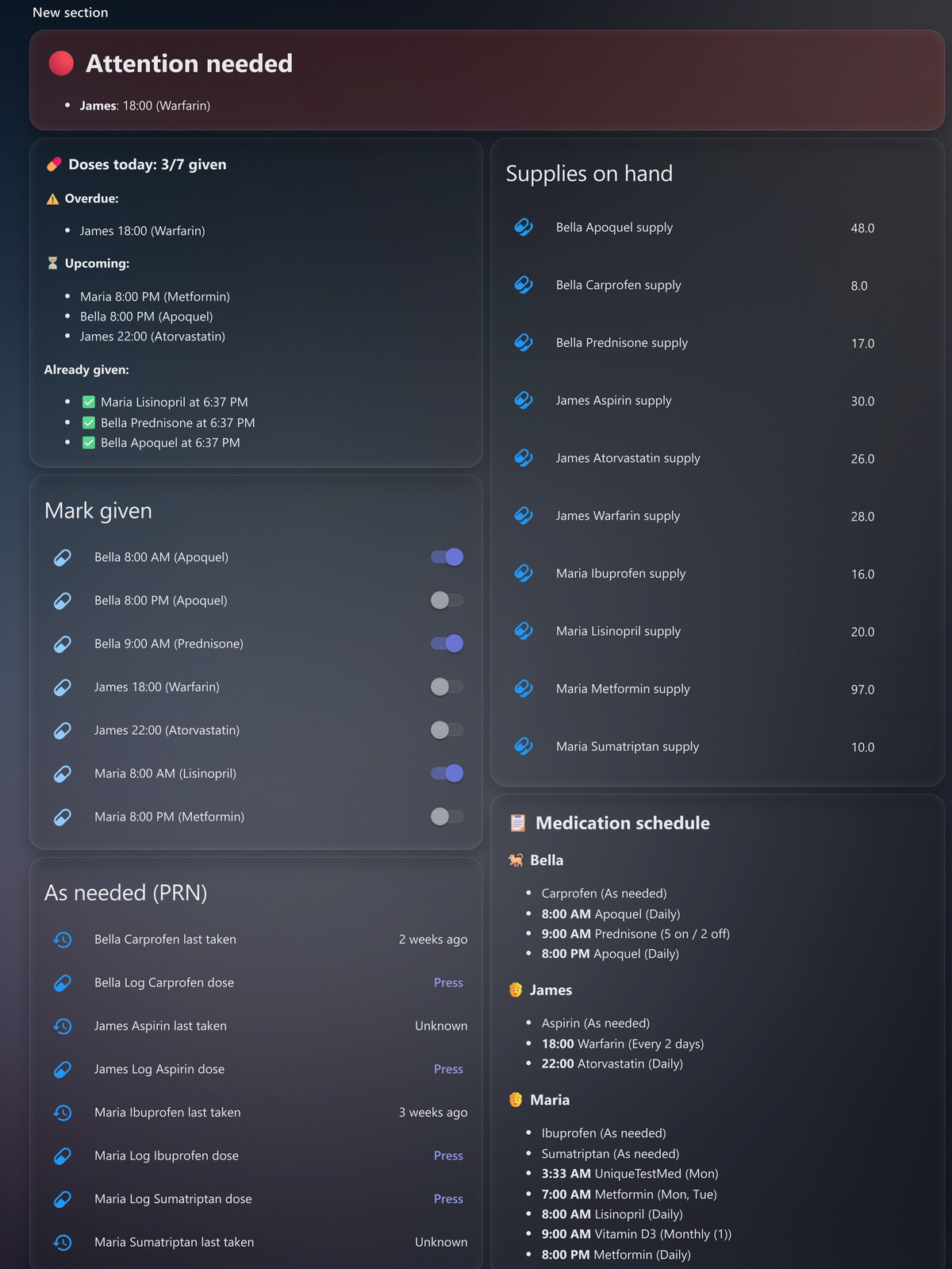
The model is small and worth getting straight before anything else:
  one integration entry  =  one patient (a name, an icon type, and
                           a notify target). Add it again for more patients.
  a dose               =  a time + one or more medications + a schedule.
                           Each dose becomes a switch (on = given today).
  the daily reset      =  the integration turns every dose off at your
                           reset time (default 00:01), crash- and restart-safe.
A dose can group several medications in one string — they're split on
&, +, a comma, or a spaced slash ( / ),
while a bare slash is kept so TMP/SMX or 5mg/ml stay
whole. Everything below hangs off those two things, the patient and the dose.
[ What it does ]
  Scheduling & doses
    — five schedule types per dose: chosen weekdays (all seven =
      daily), every N days (interval), X-on / Y-off (cycle, e.g.
      21 on / 7 off), chosen days of the month (monthly), or
      as-needed (PRN, no schedule and no reminders)
    — 12h or 24h display per patient; fractional per-dose amounts (0.5),
      and an optional "ask for amount when marking" for a dose that varies

  As-needed (PRN) meds
    — a "Log dose" button (and a log_dose service) with a last-taken time,
      a doses-today count, and a rolling 30-day "days this month" count
    — an optional over-dose guard (minimum interval and/or daily cap) that
      warns, never blocks, when another dose now would be too soon or over

  Marking a dose
    — partial skip: mark a grouped dose given while leaving one med out, so
      its supply is not counted and the skip shows in history
    — skip today (a third state, no supply deducted) and snooze ("remind me
      later", configurable), which defers the missed-dose escalation too

  Supply, refill & cost
    — per-medication counts that decrement as doses are given, with
      doses-left, a run-out estimate, a low-stock red flag, and a refill button
    — optional prescription "refills remaining", flagged when it runs out,
      and an optional per-unit cost (value on hand, cost per dose, monthly)

  Status, data & sharing
    — a glanceable red/green needs-attention sensor per patient that trips
      on elapsed time alone and fails safe toward "problem"
    — a next-dose timestamp, a read-only medication calendar, and a
      "current medications" summary to hand a vet or a doctor
    — caregiver and admin dashboards (split by HA user role), dose
      events for your own automations, and localized config screens
      (en, de, es, fr, it, nl, ru)

  Pill-box plan (opt-in)
    — a per-day plan for filling a pill organiser: pick a day and get one
      table of every medication and the amount for each time-slot compartment
    — one row per med, a column per slot, the amount in each cell, computed
      for the real date — so every-N-days, cycles and monthly schedules land
      on their actual days, odd and even weeks included
    — off by default; turning it on adds a plan sensor and a day-offset
      number (0 = today, resets at midnight), and the dashboards gain a
      "Pill-box plan" card
    — the amount is the dose's own value, else the med's per-dose supply,
      else 1 — built from the integration's own data, so it can't disagree
      with the schedule

A day's plan is one table — med down the side, slots across, the amount
to drop in each compartment:

  Med         08:00  09:00  20:00
  Atozet               1
  Keppra        1             1
  Marcoumar     ½
[ Install ]
1. Install the integration (HACS). Medication Reminder is in
the default HACS store. Open HACS, search for
Medication Reminder, install it, and restart Home Assistant.
That is the whole install. Just merged and not showing yet? It can take a few
hours — until then add
https://github.com/magikh0e/ha-medication-reminder as an
Integration under HACS → Custom repositories, or grab a
direct download.
2. Add a patient. Go to Settings → Devices & Services → Add Integration and add Medication Reminder. One integration entry is one patient; add it again for each additional patient. Define that patient's doses and schedule in the UI — entities auto-create and survive restarts, with no YAML to edit.
3. Add the reminder automations. The entities exist now, but the actual reminders are driven by automations. Set them up once — see the next section, and mind the one gotcha.
[ Reminders & automations ]
The integration creates and tracks the entities; the reminders — the nag, the missed-dose escalation, the early-dose warning, the un-mark alert, and the low-supply reminder — are driven by automations you add once. There are two routes, and mixing them up is the number-one support question. Pick one.
Blueprints (recommended). In
Settings → Automations & Scenes → Blueprints → Import
Blueprint, paste the blueprint file's URL — not
its contents. The files are medication_reminders.yaml (reminders,
missed-dose, and the group-by-time toggle), mark_given.yaml (the
Mark given / Skip today / Remind me later buttons and the snooze delay),
early_dose.yaml, low_supply.yaml, and
unmark_alert.yaml. Update one later from its three-dot menu →
Re-import.
Or paste YAML. Use only
companion-automations.yaml (it has no !input), pasted
into your automations.yaml.
The gotcha. The blueprint files use Home Assistant's
!input tag, which only works through blueprint import.
Paste a blueprint file's contents into automations.yaml,
configuration.yaml, or a YAML editor and you get:
unknown scalar tag !
could not determine a constructor for the tag '!input'
The fix is to import by URL, or to use
companion-automations.yaml instead. Use one route, not both, or the
reminders fire twice. After a release whose notes say a blueprint changed, you
re-import the blueprint (or re-paste the companion YAML) to pick
it up — a plain HACS integration update does not need a re-import.
Reminders route to each patient's chosen notify target (falling back to a
caretakers group), so the action buttons need the
Companion app and a notify target set. On Android the buttons
show directly; on iPhone long-press or pull down the notification to reveal
them. Android shows at most three, and the reminder uses exactly three:
Mark given, Remind me later, and
Skip today.
[ Dashboards ]
Five Lovelace layouts ship in dashboards/:
lovelace-sections.yaml (recommended, a responsive Sections view),
lovelace-card.yaml (one tall card), lovelace-card-2col.yaml
(two columns), lovelace-caregiver.yaml (simplified and safe to
share), and lovelace-admin.yaml (the full setup and audit view).
They are auto-discovering: they find every patient and dose on their own, with no names or entity ids to edit, so adding, renaming, or removing a patient just updates them. They do need two HACS frontend cards — auto-entities and card-mod — though the standalone red/green status panel needs neither. Opt-in extras (the partial-skip card, the adjustable-amount card, the pill-box plan card) appear only when their option is on, and you re-paste the layout after a release that changed the dashboards.
[ Download ]
HACS is the way in and always pulls the current release. To install by hand — or pin the source to a specific version — grab it straight from GitHub:
To install by hand, download a release, then unzip
custom_components/medication_reminder/ into your Home Assistant
config/custom_components/ and restart.
[ The YAML package (legacy) ]
Before the integration there was a pure-YAML package: ha-medication-reminder-yaml. It is deprecated — a single data-driven list defined every dose and you got the core reminder, nag, missed-dose, and household-synced state without any custom integration. It still works for anyone already running it, but new features and fixes go into the integration and everything the package did now lives there. Setting up fresh? Use the integration; the only reason to pick the YAML package today is a deliberate no-custom-component setup.
[ Safety ]
This is a reminder aid, not a medical device. It is fail-safe by design — overdue detection trips on elapsed time alone and errs toward "problem", marking a dose is reversible, dose state survives restarts, and every guard (early dose, over-dose, low supply) warns rather than blocks, surfacing the risk and leaving the call to the caretaker. But it runs on your own Home Assistant and your own notifications: validate it against your setup, keep a backup reminder method until you trust it, and confirm any dosing schedule with your doctor or vet. It is still in active development, so breaking changes are possible between releases.
[ Gotchas & FAQ ]
"unknown scalar tag !" on paste
    A blueprint's !input only works via blueprint import. Import by
    URL, or paste companion-automations.yaml instead — never a
    blueprint file's contents. See Reminders & automations.

The HACS page looks out of date
    HACS only re-renders a repo's README on a new release, and strips raw
    <img> tags — so the HACS view can lag the GitHub README.

Doses look out of order in 12h mode
    The device's auto-generated page sorts entities alphabetically, so AM/PM
    times can read out of order. The bundled dashboards sort by actual dose
    time; 24h format sorts correctly too.

No buttons on the notification
    The action buttons need the Companion app and a notify target set.
    On iPhone, long-press or pull down the notification to reveal them.